
Handle SEO and metas
Give every page a real title and description, keep the pages that should stay out of the index out of it, and get detail pages right.
Most SEO work on a Quilium site is not clever, it is systematic: every page has a title and a description, detail pages derive theirs from the entry, and the pages that exist for the machine rather than the visitor are excluded.
1. Metas are page data
A page carries its metas as page-level fields, written JSON-stringified through update-page. They are content, so an editor owns them, not the template.
metas is a small free-form object, and the keys our templates actually read are title, description, keywords and robots. Cairn's content-kit page carries two of them:
{ "description": "Page de référence interne — vitrine des blocs de contenu réutilisables du site Cairn.",
  "robots": "noindex, nofollow" }
robots is a raw directive string, passed through to the meta tag as written.
Metas are translatable, per locale, in the same shape — Oscilla's home page carries a French description at the root and its English counterpart under translations.en.metas. Like every page write, one locale per call, alongside the root data.
ogImage, canonical or SEO tabset. metas is all the platform gives you. Anything richer is a field you declare yourself on the page-type — and then it is yours to render.Lisière declares exactly that, a robots tabset of six checkboxes reused across every page-type through a YAML anchor, so the editor gets toggles instead of a directive string to spell correctly:
_robots: &_robots
  noIndex:
    type: checkbox
    label: No index
  noFollow:
    type: checkbox
    label: No follow
  excludeSitemap:
    type: checkbox
    label: Exclude from the sitemap

default:
  name: Default
  template: default.liquid
  tabsets:
    robots:
      name: Robots
      fields:
        <<: *_robots
Declared that way, the flags are read as page.custom.noIndex, flat — the tabset name is not part of the path.
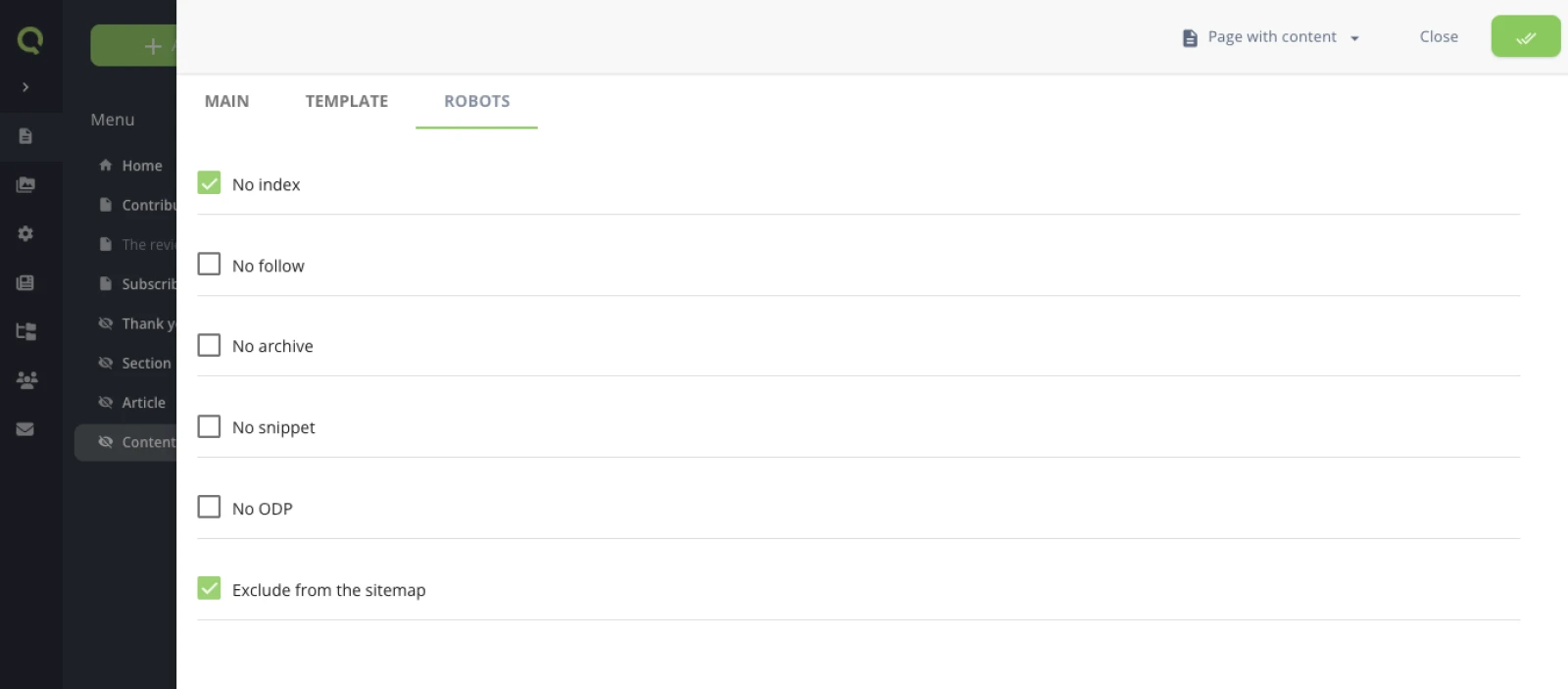
2. Render them in the root layout
Written once, in layout.liquid, they apply to every page:
<title>{% block title %}{{ page.title }}{% endblock %}</title>
A detail page has no title of its own until its query resolves, which is why the pattern is to assign the title outside any block, from the resolved entry:
{% if page.custom.article and page.custom.article.size > 0 %}
  {% assign pageTitle = page.custom.article[0].title %}
{% endif %}
3. Keep the right pages out of the index
Three different situations, three different answers, and mixing them is how a site disappears from search results.
| Situation | What to do |
|---|---|
| A page that exists for editors, a content kit, a component gallery | active, visible: false, and noindex |
| A thank-you page after a form | active, visible: false, and noindex |
| The hidden page behind a detail route | active, visible: false, indexable: it is what serves every entry |
| A page that should not exist any more | a redirection, not a deactivation |
visible: false only removes a page from the menu. An inactive page 404s everywhere. Neither one is the way to say "do not index this".4. Multilingual pages need alternates
Each locale is its own URL, so each page must point at its counterparts with hreflang. The mechanics are in Run a multilingual site; the SEO rule is simply that every localised page declares every alternate, including itself.
5. Let an agent do the sweep
Writing one description is a judgement call. Writing the forty that are missing is an inventory job, and that is the part to hand over.
List every page of this site whose metas carry no description,
with its title and the first paragraph of its content.
Then draft one description per page, under 160 characters,
in that page's own language. Show me the list before writing anything.
Asking for the content, not just the title, is what makes the drafts usable: the agent reads the real copy through get-page-with-content instead of paraphrasing a title back at you. And the review step is not ceremony — a description is a promise made to someone reading a result list, and one that reads beautifully while describing the wrong page costs more than the empty field it replaced.
Two things the agent cannot infer, so state them: metas are a page write, one locale per call, so a bilingual site is two passes and not one; and the pages that should stay out of the index are not missing a description, they are a different job — section 3.
6. Check before you ship
Load the live URL, not localhost, and look at three things: the title in the tab, the description in the page source, and the response code of a URL that should not exist. See Publish and go live.
7. What the platform does not do for you
Three things people expect to find in the settings. Only one of them is there, and the other two are yours to write — which is worth knowing before you go looking.
robots.txt is a static asset
It is a file in public/, shipped by quilium push like the CSS and the favicon, and served from the root:
# Allow crawling of all content
User-agent: *
Disallow:
Nothing declares it and nothing generates it — which also means it is not per locale. /robots.txt answers; /fr/robots.txt is a 404, and that is correct: the file belongs to the host, not to a language.
Disallow: / on that host's file — and remembering to take it out on the day you go live. Keeping a page out of the index is a different job, done per page: see section 3.There is no generated sitemap.xml either — /sitemap.xml is a 404. The sitemap variable your templates use for the navigation is the page tree in Liquid, not a file a crawler can fetch. If you want the XML, it is a page-type with its own headers: and a template that writes the body, the same shape as the JSON feed in Build an events agenda.
Open Graph and JSON-LD are yours
No defaults, no toggle, no generated tags. What exists is the metas from section 2, and everything else is markup you write once in layout.liquid — where it costs a few lines, since the values are already resolved:
<meta property="og:type" content="website">
<meta property="og:title" content="{% if page.metas.title != blank %}{{ page.metas.title }}{% elsif page.title != blank %}{{ page.title }}{% else %}{{ globals.siteName }}{% endif %}">
<meta property="og:description" content="{% if page.metas.description != blank %}{{ page.metas.description }}{% else %}{{ globals.tagline }}{% endif %}">
<meta property="og:locale" content="{{ locale.slug }}">
That is Vesper's, and it is the only demo site that carries any — the fallback chain is the interesting part, not the tags: page meta, then page title, then the site name from a global field, so a page nobody filled in still shares as something.
Structured data is on nobody. No demo site ships JSON-LD, and the platform emits none. A <script type="application/ld+json"> in the layout, or in the page-type template of the thing being described, is the whole of it — an article's fields are already resolved as page.custom.article.* at that point, so the block writes itself. Mind the | json rule from the events agenda while you do: a value that resolves to nothing emits nothing, and produces invalid JSON inside a valid page.
Related
Last updated September 7, 2026.