
The architecture pass
Let the agent read the prototype, propose the model, and write it once you have approved — the types, the page tree and the routes.
This is the tutorial where the decisions get made. Everything downstream — the routes, the templates, the content — follows from the model chosen here, which is exactly why an agent must propose it and you must approve it.
What you will have at the end
A content model on the site — the collections, the content-types, the page-types — plus the page tree and the routes that turn it into addresses, verified by reading the site back rather than by trusting the agent's summary.
Before you start
Connect your agent done: empty site, local project, connected agent, prototype on disk.
1. Ask for a proposal, not a build
The single most useful instruction of the whole path.
Read the prototype in proto/ and design the architecture for this site.
Show me a simple bullet list for validation, one line per type: what it is
and where it is used.
Write nothing to the site before I approve it.
Three sentences, two of which are guardrails. Nothing in there says how to model a Quilium site, and nothing needs to: the agent loaded quilium-builder, then pulled practices-conventions-architecture, reference-wysiwyg-config, processes-scaffolding-from-html-prototype, processes-scaffolding-scope-greenfield-site and practices-conventions-naming off the MCP server before it opened a single page of the prototype. Restating any of that in the prompt would only have made it longer.
What the prompt does carry is the part no skill can know: the shape you want to read, and the fact that you have approved nothing yet.
An agent that writes before proposing is an agent you will be migrating away from within the hour.
2. Read the proposal like an architect
Here is what came back on this prototype, quoted as it arrived.
Collections

- `articles` — the pieces themselves: title, slug, section, author, standfirst,
  cover, body, read time, date, featured. Feeds the home lead, the home feed,
  every section feed, the related block, and its own page.
- `contributors` — the bylines: name, slug, role, portrait, bio. Feeds the
  contributors grid and the author box under an article. No route — the
  prototype's cards are deliberately not clickable.
- `sections` — the four editorial sections: name, slug, teaser, description,
  image. Feeds the nav, the four doors on the home, the editorial line on
  The review, and its own section page.

Content-types

- `pageHeader` — stamp + title + rich intro, optional aside column, variant
  light/dark/centred. Contributors, The review, Newsletter, Thank you.
- `featured` — the lead piece, queried from articles. Home.
- `articleFeed` — heading + note + a query on articles. Home.
- `sectionList` — heading + a query on sections, variant doors/editorial.
  Home, The review.
- `reviewBand` — dark band, one positioning sentence, one link. Home,
  Contributors.
- `newsletterBand` — kicker + title + lead + CTA. Home, Article, Section,
  Contributors, The review.
- `imageText` — image + title + rich body + mono note, image left or right.
  The review.
- `contributorGrid` — a query on contributors. Contributors.
- `subscribeForm` — first name, email, GDPR consent, submit, redirect.
  Newsletter.

Page-types

- `default` — already on the site. Home, The review, Contributors,
  Newsletter, Thank you.
- `sectionDetail` — carries the query resolving the section from the URL,
  plus the query for its pieces. One hidden page, four URLs.
- `articleDetail` — carries three queries: the piece, its author, the
  related pieces. One hidden page, N URLs.

Global fields

- `issueNumber` — "No.07". Appears in the header, the footer, the featured
  stamp, the review band and the confirmation stamp. Five places across the
  chrome and the blocks; nothing but a global reaches all of them.

Editor palette

- Site-wide rich-text styles, decided now because they change the schemas:
  `accent` for the green span, `link-leaf` for the arrow link, `btn-primary`,
  and `threshold-list` for the bordered list with the lisière glyph.

Three calls worth confirming before I write anything

1. Sections as a collection rather than four pages — the same copy otherwise
   lives in four places.
2. The prototype carries three different texts per section: short on the
   doors, longer on The review, a standfirst on the section page. Two fields
   proposed instead of three near-duplicates.
3. The newsletter's three arguments as one rich-text field plus a palette
   style, rather than a repeat — each item is a label and a paragraph, the
   shape the architecture skill flags as a rich-text field in disguise.

Nothing written to the site.
Three questions answer most of the review:
- Is anything repeated across pages that is not a content-type? That is a missed reuse. Here the newsletter band is on five pages and the review band on two — both are types, so nothing is missed.
- Is anything a repeat field that needs its own URL? That is a missed collection. The four sections are the case: repeated in the nav, on the home and on The review, and each addressable. The contributors are the mirror image — a collection deliberately without a URL.
- Does a page-type exist only because one page looks different? That is usually a content-type instead. Five of the seven pages share
default; the two extra types exist for the queries they carry, not for their layout.
Then note what the proposal ends with: three questions of its own, and no writes. That is the difference between a proposal and a build.
3. Correct it in your own words
Corrections are conversational. You are not writing YAML here.
No.07 is part of the design template. It does not need a field.
That deletes the model's only global field, and the reasoning behind it was not wrong. The agent found the same number in five places — the header, the footer, the featured stamp, the review band, the confirmation — and a value that reaches the chrome from five blocks is precisely what a global field is for. It read the prototype correctly.
What a prototype never says is who owns a value. It shows where the number appears, not whether anyone will ever edit it. That answer lives with the person who owns the design, and it is the reason this step is a conversation rather than a review.
4. Let it write the types
Once the model is agreed, the writing is mechanical. Order matters: a collection has to exist before anything queries it.
Approved — with one change: No.07 stays in the design template, so drop
the global field.
Write it, and go further than the proposal: I want the page tree and the
routes too. The prototype's own links say what the URLs should be.
Four lines, and again none of them says how. The approval and the correction are the first two; the third widens the scope, because the proposal was told not to design URLs and that instruction has to be lifted explicitly; the fourth points at the only place the URL scheme is written down.
The run, condensed to its calls:
⏺ get-skills() → get-skill × 8
  ⎿ yaml-syntax, itemset-types, content-types, page-types,
    fields-catalog, settings-yaml-patching, routing, forms

⏺ The subscription form saves into a collection, and the forms skill is
  blunt about it: create that collection first or `save` fails silently.
  It is not in the proposal. Adding `subscriber`.

⏺ update-settings-partial(item-set-types) × 4
  ⎿ section, contributor, subscriber, article

⏺ update-settings-partial(content-types) × 10
  ⎿ _custom-fields, pageHeader, featured, articleFeed, sectionList,
    reviewBand, imageText, contributorGrid, newsletterBand, subscribeForm

⏺ update-settings-partial(page-types) × 4
  ⎿ _robots, default (rewritten to carry its robots tabset),
    sectionDetail, articleDetail

⏺ add-page-to-navigation × 6
  ⎿ the-review, contributors, newsletter        visible
    thank-you, section, article                 hidden

⏺ create-route × 7
  ⎿ section  /{{section.slug}}  →  /section/{{section.slug}}
    article  /{{article.slug}}  →  /article/{{article.slug}}
    home, theReview, contributors, subscribe, thankYou  →  path ''

⏺ update-settings-partial(article.preview, section.preview)
  ⎿ the two collections with a detail URL get their backoffice
    "View on the site" button

⏺ Done. 4 collections, 9 content-types, 3 page-types, 7 pages, 7 routes.
  Nothing published.
The YAML lands in the backoffice, where it is editable by hand and previewed field by field as you type:
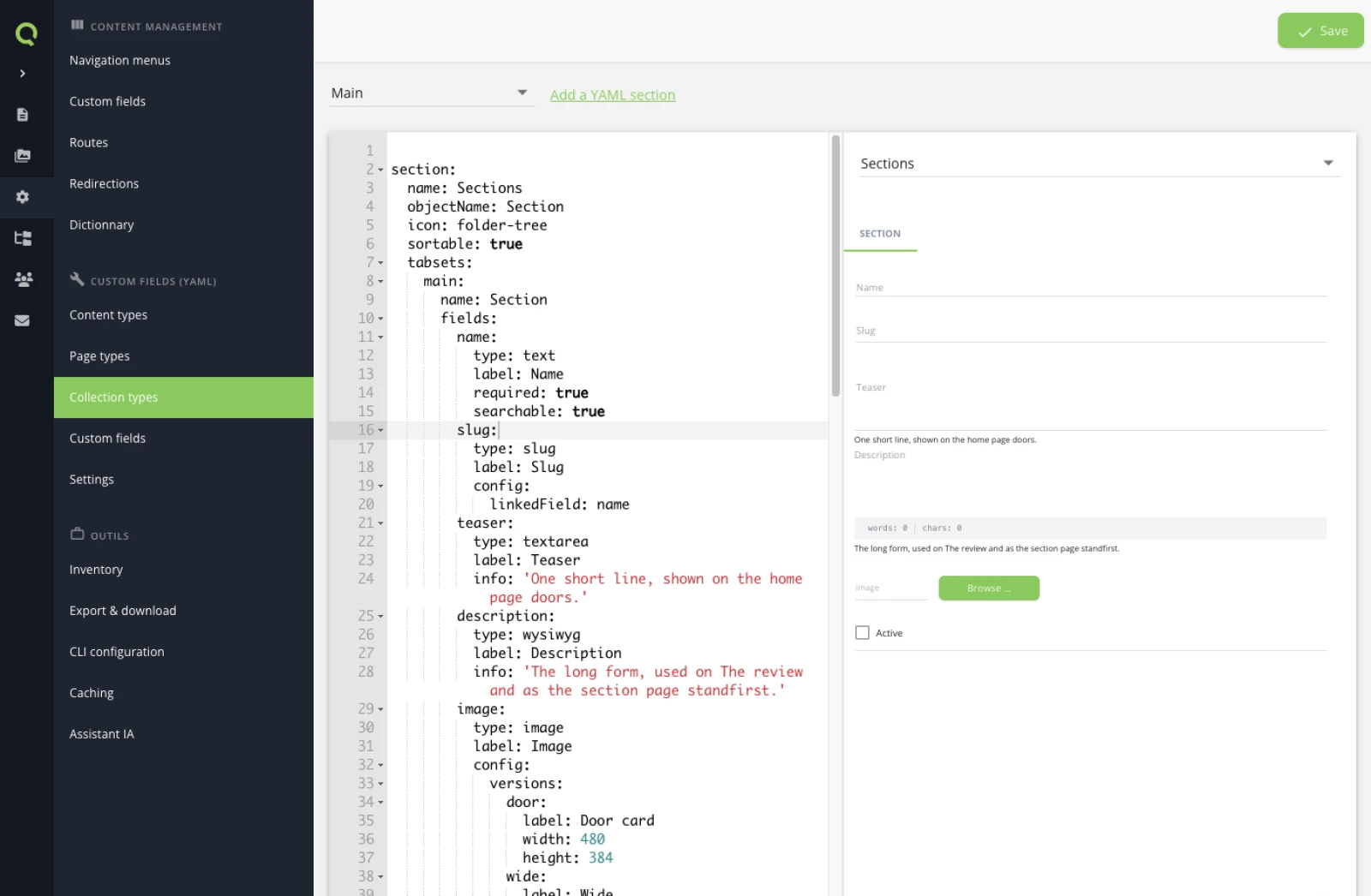
save point at a collection that does not exist. Approving a model is not the same as proving it, and the writing pass is where the difference shows.5. Look at the tree and the routes it produced
URLs come from the page tree, not from the templates, so this is the part to read carefully while it is still free to change.
Seven pages. Four of them are the site's own pages; three exist for reasons a visitor never sees.
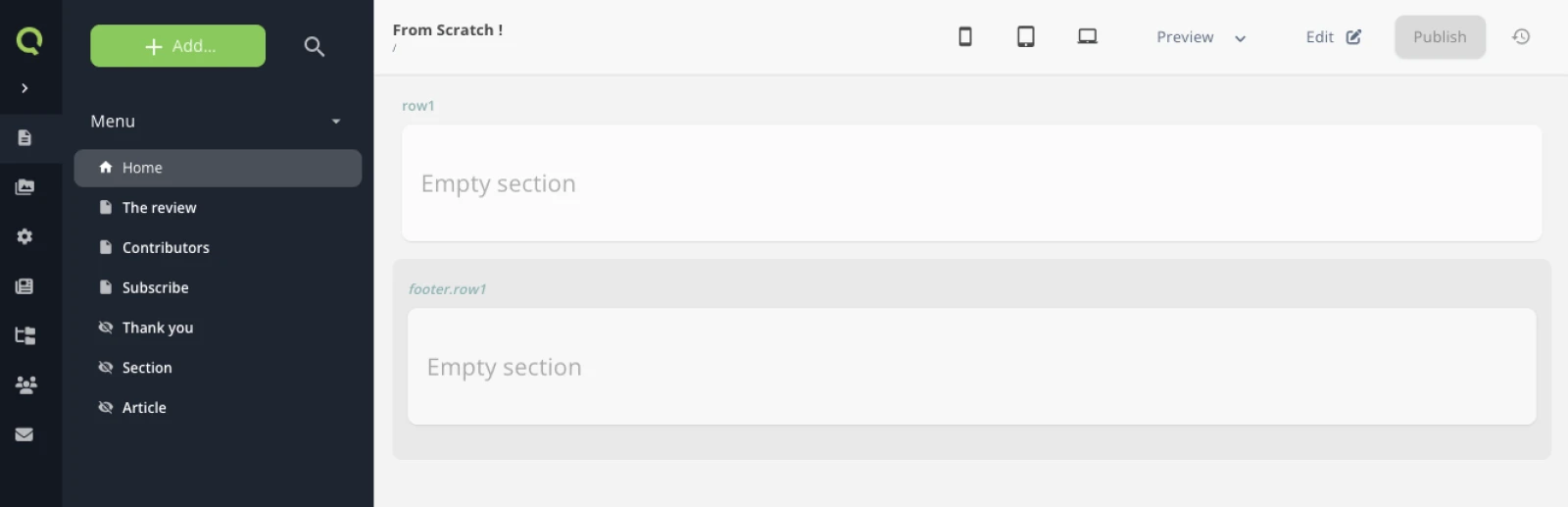
The crossed-out eye is the interesting one. Thank you is hidden because a confirmation page belongs at the end of a form, not in a menu. Section and Article are hidden because they are not pages at all in the editorial sense — they are mount points, each one carrying the URLs of a whole collection.
The four editorial sections are not in this tree either, and that is the consequence of having made them a collection: the menu will be built partly from pages and partly from a query.
Then the routes, which are what turns a mount point into as many URLs as the collection has entries:
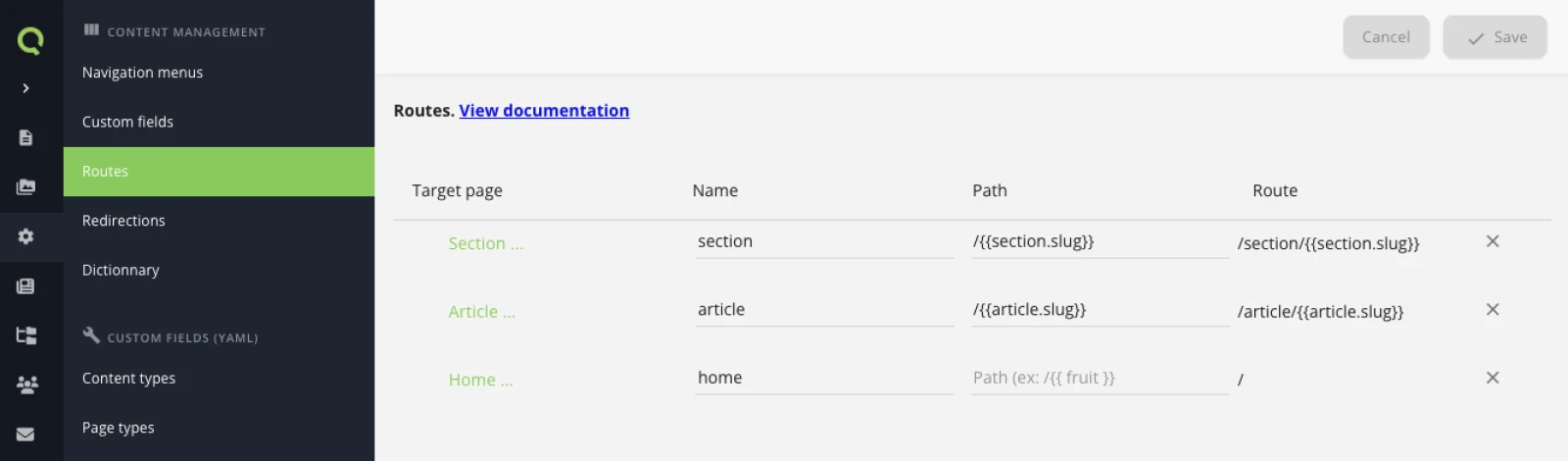
Read the two columns on the right against each other, because that is where the most common mistake shows. The path carries only the variable part of the URL; the route is what Quilium computes by appending it verbatim to the page's own URL, which is why the path starts with a slash. Write /article/{{article.slug}} in the path and you get /article/article/<slug> — a URL that answers, on a page that renders, pointing nowhere anyone expects.
The bottom row is the other half of the lesson: home has an empty path, not /. That holds for every fixed page, and it is not cosmetic — a path of / appends a trailing slash to the computed route, which is not the address the page is served at.
6. Verify against the site, not against the answer
Call get-site-settings and list every type you created, with its fields.
Flag anything in the proposal that is not on the site.
An agent reporting "done" has written the calls. Reading the settings back is what proves the site holds them — and the backoffice holds the same answer, on the Collection types screen shown above.
What you learned
- An agent is fast at execution and needs you for decisions, which is why this pass is separate from every other one.
- The model is approved before it is written, and read back after — and approving is not proving: the writing pass found a collection the proposal had missed.
- URLs come from the page tree; a route only adds the variable part.
- A collection needs a hidden mount point to hang its detail URLs on.
Read Routing and URLs for the model behind the last part.
Next: The layout and the home page, where all of this finally renders.
Last updated September 7, 2026.