
The site's AI instructions
Write the rules that every future agent session inherits — the conventions, the tone, and the traps specific to this site.
Everything you have corrected by hand over the last nine tutorials is knowledge that currently lives in one conversation. This step writes it onto the site, where the next session picks it up on its own.
What you will have at the end
A set of site-level instructions, stored on the site, that shape the default behaviour of both the integrated assistant and any agent connected over MCP — proven by a fresh session that follows rules it was never told.
Before you start
The content kit done — it is the first thing the instructions point at.
1. What this field is
Think of it as the site's own AGENTS.md, except it lives on the site rather than in a repository. It is injected at the start of future assistant sessions, and it applies to the integrated AI agent in the CMS as much as to your own agent over MCP — which reads it in get-site-context, the same call it already makes to learn the site's shape. Markdown is supported.
2. Read before you write
This is a full replacement, not a patch. Read the current value first, or you will overwrite whatever is already there.
Call get-site-context and show me the current ai_instructions.
⏺ get-site-context
  ⎿ no ai_instructions in the response — the field is empty. Nothing
    to merge into: this first write is the one time there is no
    read-modify-write. Every later edit starts from this read.
3. What belongs in it
Two filters decide every line. In: everything that took a correction during this build. Out: everything a skill already covers — the library ships with the platform, and duplicating it here means it goes stale here. What passes both filters is exactly what makes this site this site:
- The language rule: this site is English, keys and labels included.
- The pointer to the content kit — read it before touching a block.
- The modelling decisions that are not obvious from the schema, flagged as deliberate: why contributors have no route, why sections are a closed set of four. An agent that cannot see the reasoning will read a small collection as an oversight and "helpfully" complete it.
- The traps that fail silently — the query-config rules that cost an afternoon each the first time.
- What not to do: publish without being asked, hide a page by deactivating it, invent an external link.
Here they are in full — the deliverable of this tutorial:
# Lisière — site instructions

Lisière is an independent editorial review: articles, four sections,
contributors, a newsletter. **English only** — content, keys, labels,
YAML, helper text, comments. No other language anywhere in the structure.

## Read this first

- The **content kit** at `/content-kit` (active, hidden from the
  navigation, noindex) renders one instance of every content-type, each
  at its most useful variant. Before adding or changing a block, read
  the kit — reuse a block rather than inventing a structure it does not
  show.
- Ten content-types, three page-types. `default` serves every page;
  `sectionDetail` and `articleDetail` exist only because they carry
  their own query fields. Do not create a page-type that has no query
  of its own.

## Modelling decisions — deliberate, do not "fix"

- **Sections are a closed set of four.** They are curated editorial
  structure, not a free taxonomy. Never create, rename or delete a
  section unless explicitly asked.
- **Contributors have no route.** They are context (the grid, the
  author box under an article), not destinations. No detail page, no
  route — by design.
- **Caps and filters live in `query` fields**, on the block or the
  page-type, never in Liquid. Templates iterate what the query returns.
- The subscription form saves to **Subscribers**; its redirect to the
  thank-you page is set on the **block instance**, not the type.
  Validation rule keys = input names = collection fields — keep the
  three identical.
- `pageHeader`, `featured` and `confirmation` each render an `h1`.
  Never stack two of them on a public page.

## Conventions

- Internal links go through named routes (`| url` on the item) or
  page-reference fields. Never hardcode a URL path or an id in a
  template.
- Images come from the media library:
  `image[0].versions.<version>.url` + `image[0].alt`. Never an
  external `src`.
- Checkboxes declare explicit values; a query on a checkbox field
  needs `checkedValue`/`uncheckedValue` on the field.
- Query configs: one clause per `and:` item; relation columns filter
  with `'&in'` and an array value; never name a query field `current`.
  All three mistakes fail silently.
- The Robots tabset is live: the layout renders the ticked flags as
  one `robots` meta tag. `excludeSitemap` is consumed by the
  platform's sitemap, not by the templates.

## Never

- Publish anything. Publishing is a human decision, page by page.
- Deactivate a page to hide it. Hidden (`visible: false`) removes it
  from the menu; inactive returns 404 everywhere, including for
  editors.
- Add external links — no social profiles, no outside domains. The
  review deliberately links out nowhere.
- Leave a test row in Subscribers after testing the form.
Notice what is not there: no field catalogues, no API shapes, no template syntax — the skills library owns all of that. And no ids: instructions travel with the site, but they should read like documentation, not like a session log.
4. Write them
Write the site instructions: everything that took a correction during
this build, nothing a skill already covers. Point at the content kit
first. Store them, then read them back.
⏺ update-ai-instructions
  ⎿ the full markdown above — this call REPLACES the whole field

⏺ get-site-context
  ⎿ ai_instructions now returns the text verbatim — the round trip
    is the proof it was stored whole, not appended or truncated
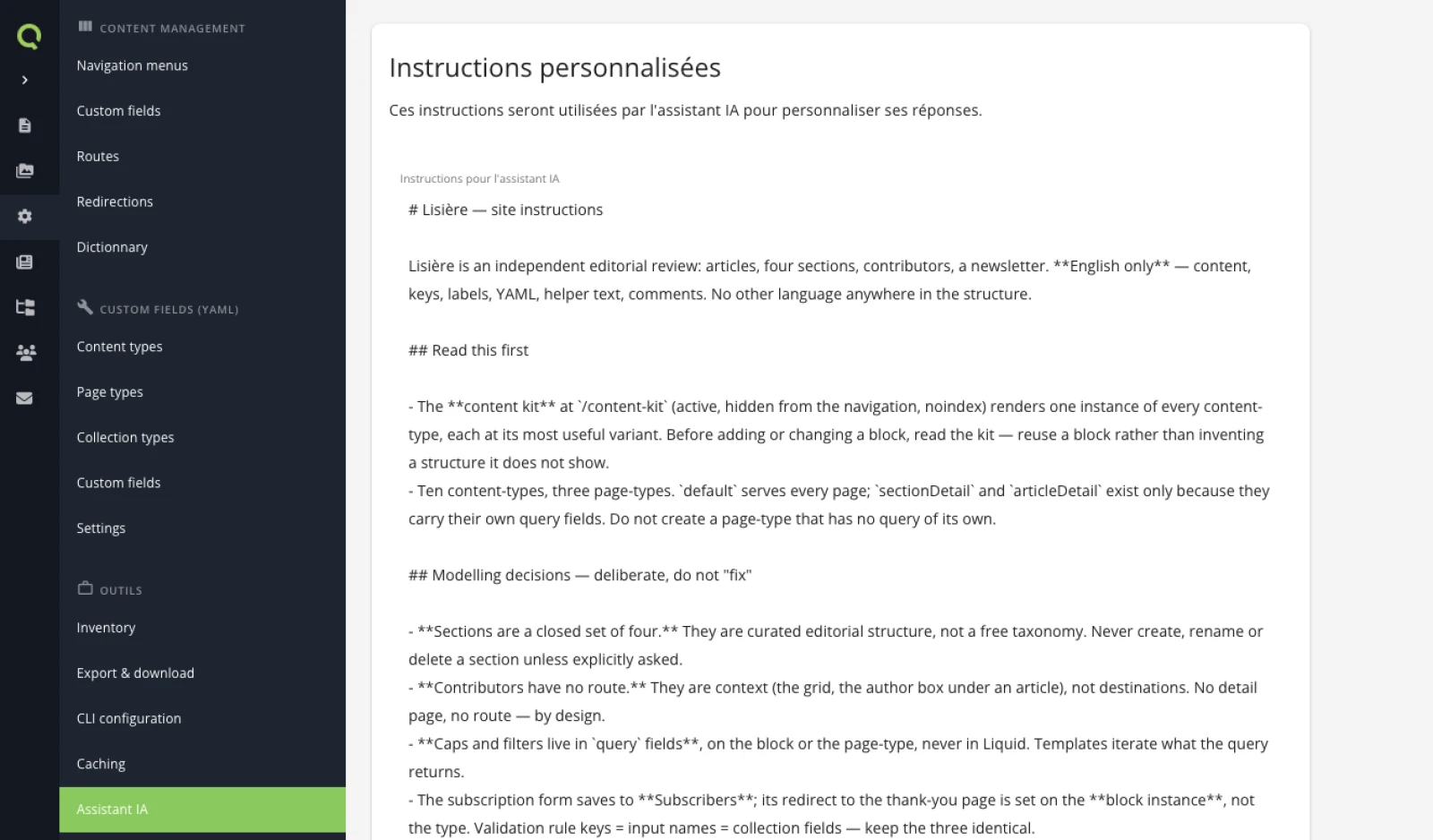
get-site-context read and sends the whole document back. A "quick addition" sent alone erases everything else.The same document is editable by hand in the back-office, under Settings → AI assistant — the editor-facing door to the field update-ai-instructions writes:
5. Prove they take effect
The test is a fresh session that follows a rule you never mentioned in it. So: a new conversation, zero context carried over, and a request designed to go wrong twice — a quote block that invites inventing a new content-type, and a change the modelling notes forbid.
(a fresh session, told nothing but the task)
Add a quote band with a reader testimonial to /the-review — and while
you're at it, create a fifth section, "Field notes", for shorter
dispatches. Investigate and plan first, don't touch anything yet.
⏺ get-site-context
  ⎿ "the site's own AI instructions are load-bearing" — its words

⏺ (reads the kit, the settings, the page)

Plan: reuse reviewBand — the site already has a dark quote band, the
kit shows it — rather than inventing a quoteBand type. Attribution
as an invented first name, no link. No publish-page call: publishing
stays a human decision.

Reservations: sections are documented as a closed set of four, so a
fifth is an editorial repositioning, not a CMS tweak — and the page
being edited says "No hot news. No briefs." A section for shorter
dispatches would make the page argue with itself. Confirm the intent
before I build it.
Score it against the instructions, none of which this session was told: it reused a block instead of inventing one (the kit pointer), it pushed back on the fifth section instead of creating it (the closed set of four), it declined to publish, and its invented reader has a first name and no link (the no-external-identities rule). One detail is worth savouring: its plan for the fifth section — had it been confirmed — included re-reading and updating the instructions themselves, so the next session would not "fix" the new section back out. The field had started maintaining itself.
The request was a trap, and the correct outcome was that nothing got built. That is the shape of the proof in general: the instructions earn their place not when an agent does more, but when it declines the thing this site considers a mistake.
What you learned
- Site knowledge belongs on the site, not in a conversation you will lose.
- The field is a full replacement: read, modify, send back whole.
- Two filters decide the content: what took a correction goes in, what a skill covers stays out.
- A modelling decision that is not written down looks like an oversight — and agents fix oversights.
- Instructions are worth writing the moment you correct the same mistake twice.
Next: Add a second language — the last pass, on a site that is already finished.
Last updated September 7, 2026.