
A static page
Build the review's manifesto page, and see how much of it is already done — because a page is an assembly of blocks, not a new template.
This is the shortest tutorial of the path, deliberately. A page with no route of its own is the case where the model pays off immediately: most of the work happened two tutorials ago.
proto/the-review.html, on your 9055 tab.What you will have at the end
A second page on the site, built with no new page-type, no new YAML, and two new templates — plus the one thing this page introduces that serves the whole site: the editor's style palette.
Before you start
The layout and the home page done: the chrome exists and / renders.
1. Reuse the page-type you already have
Most pages need no page-type of their own. A dedicated one is only justified when the page carries its own queries — a detail page, typically. This one does not: /the-review has existed since the architecture pass, as a plain default page with nothing on it. Open it — the chrome renders, the middle is empty. That hole is today's whole scope.
And "static" deserves a caveat before you read the prototype: one of this page's four sections lists the four editorial sections from their collection. Static means no route and no page-type of its own — it does not mean no data.
2. One prompt, and why it says what it says
Read proto/the-review.html next to the list of content-types the architecture pass wrote, and the accounting is quick: the editorial line is sectionList, the newsletter band is newsletterBand — both already rendering on the home. The manifesto is pageHeader and the workshop is imageText — types that exist, templates that don't.
What no skill can know is the state of that accounting, and one gap you spotted in the prototype's prose: the manifesto colours a single word green, and the workshop links to two pages from inside a sentence. Neither is a field. So the prompt carries exactly those three things:
The Review page now: proto/the-review.html.
Two of its four blocks already exist — reuse them, don't rebuild them.
Before writing the two new templates, set up the wysiwyg style palette:
the manifesto puts one word in green and the workshop links inline from
its prose — that is editor styling, not fields.
Content before templates, as on the home.
The run, condensed:
⏺ get-skills() → get-skill × 2
  ⎿ fields-catalog, content-blocks-crud — the wysiwyg-config skill is not
    in this site's manifest, so the palette syntax comes from reading, not
    guessing: it lives in the miscellaneous settings, under wysiwyg.styles.

⏺ update-settings-partial(miscellaneous) → refused
  ⎿ the partial API only patches collection-shaped settings; miscellaneous
    is one YAML object, so the write is update-setting — a full replace.
    The block is empty on this site, so "full" costs nothing today.

⏺ update-setting(miscellaneous)
  ⎿ wysiwyg.styles: one entry — accent, tag span, class accent-word

⏺ Bash(quilium media upload ../proto/assets/img/the-review-workshop.png)
  ⎿ ✓ uploaded — then update-media to carry the prototype's alt text

⏺ add-content-to-page × 4, in prototype order
  ⎿ pageHeader      the manifesto — the accent already in its intro
    sectionList     variant: editorial — nothing else to fill, the query
                    does the work
    imageText       the workshop — both links inside the body, no CTA field
    newsletterBand  the same values as the home's; same shape, second page

⏺ Write elements/pageHeader.liquid, elements/imageText.liquid
  ⎿ plus two CSS rules in site.css: .wysiwyg a, and .accent-word

⏺ Bash(quilium push)
  ⎿ /the-review: 200 — four sections, no Liquid leaked, the four doors in
    the prototype's order
3. The palette: one entry, and why not three
The palette is the set of named styles an editor can apply from the toolbar of any wysiwyg field — each carries the CSS class it applies. It is site-wide settings, declared once:
wysiwyg:
  styles:
    accent:
      title: '<span style="color:#07761F;font-weight:600">Accent</span>'
      tag: span
      css: >
        color: #07761F; font-weight: 500;
      attrs:
        class: accent-word
That YAML lands in the back-office under Settings, comments included, next to the same screen that will hold the site's languages in the last tutorial of the path:
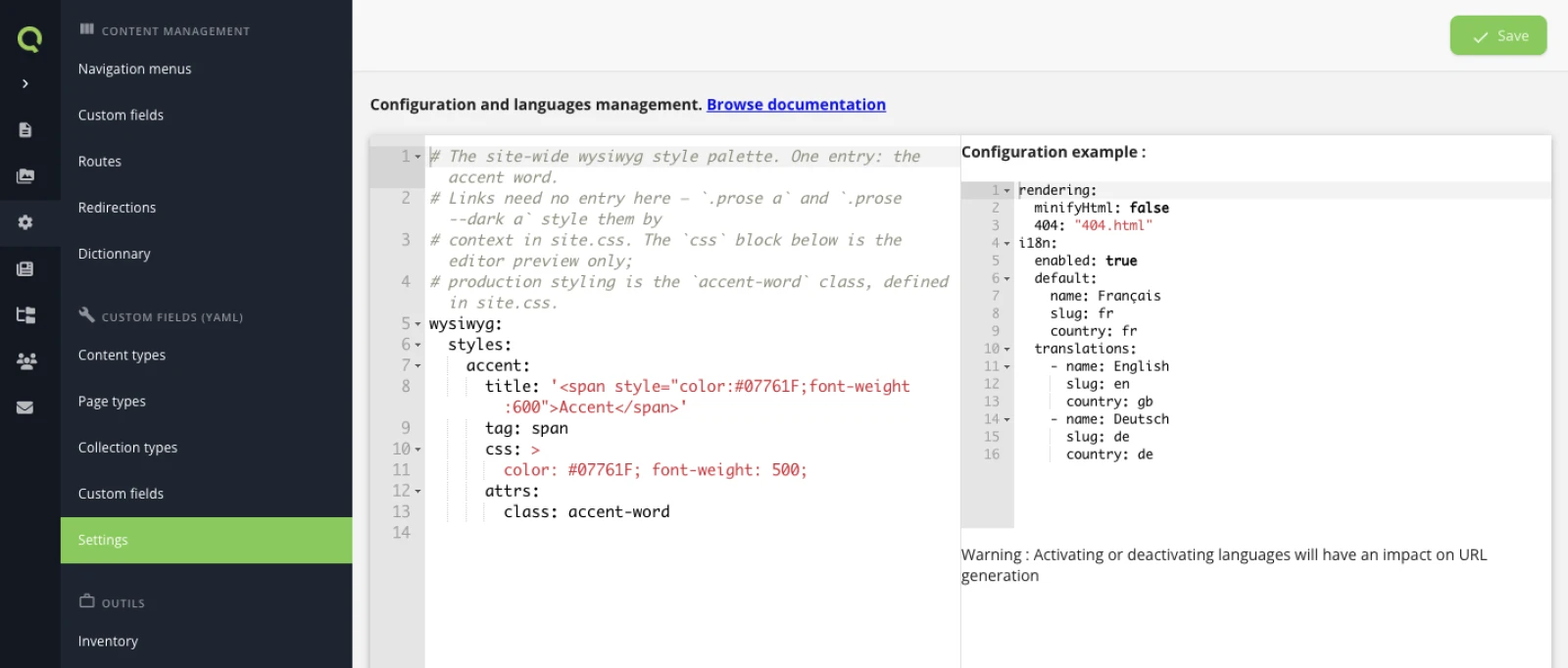
Two of the palette's keys are worth a second look.
css is the editor's preview, nothing more. It styles the selection inside the back-office so the editor sees what they are doing. On the rendered site, the only thing that arrives is attrs.class — the styling comes from your stylesheet:
.accent-word{color:var(--primary-ink);font-weight:500}
.bg-dark .accent-word{color:var(--accent)}
That second line is the reason the palette has one entry and not two. The prototype uses two greens for the same gesture — ink on cold paper, chartreuse on the understorey night. The editor should not have to know which section they are typing in; one style, and the context decides the colour.
And there is no link entry at all. The workshop's two links — Meet the contributors, Subscribe — are plain links the editor writes in the flow of the sentence. One CSS rule styles every link inside rich text (.wysiwyg a), by context, the same way. A style earns a palette entry when the editor has to choose it; a link is not a choice, it is just a link.
Here is what the editor sees — "ecotone" selected in the manifesto's intro, the style menu open, one entry:
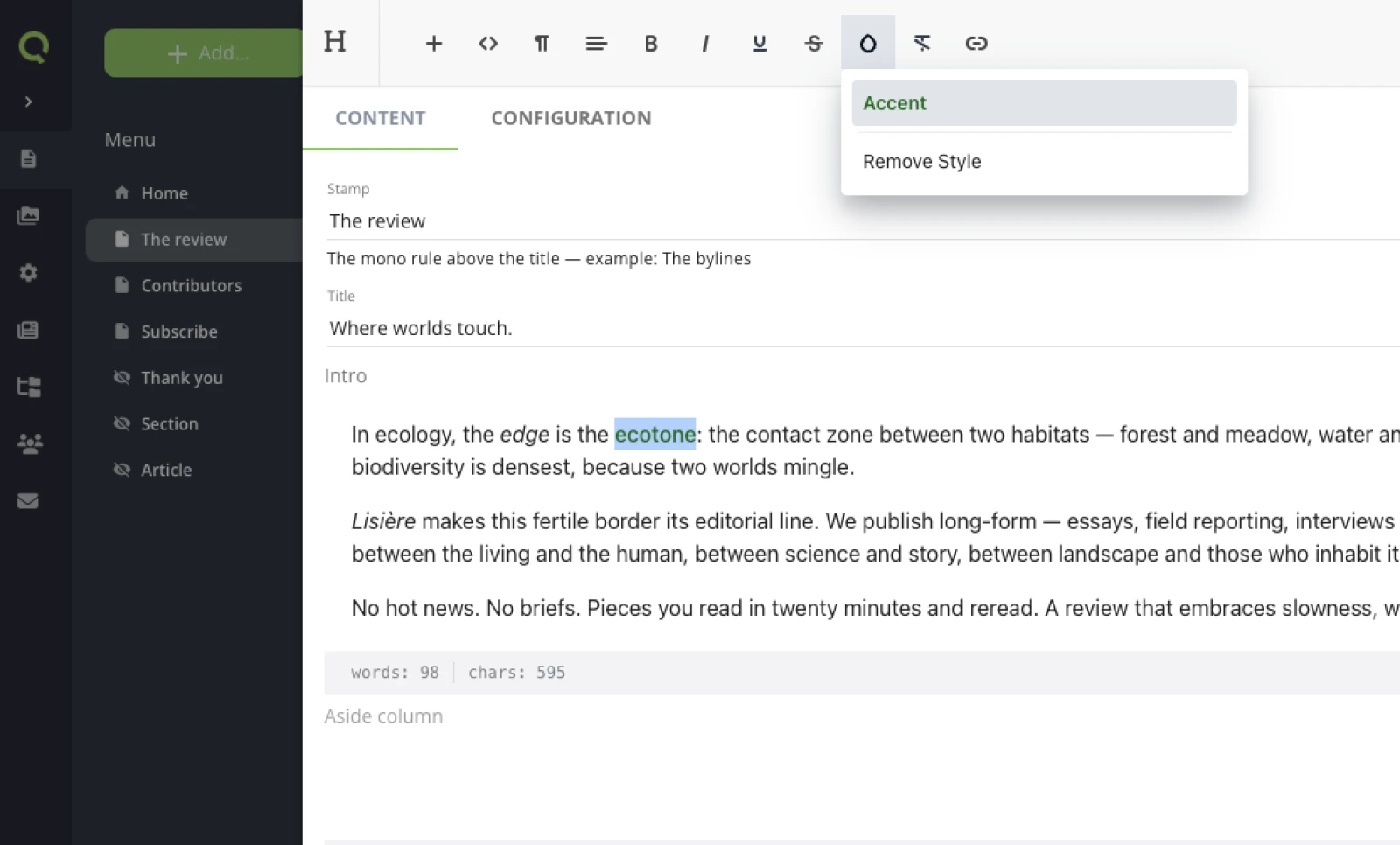
4. Notice what was reused
The ratio is the point of this tutorial, so here it is for the four sections of the page:
| Prototype section | Content-type | New today |
|---|---|---|
| The manifesto | pageHeader |
template only |
| The editorial line | sectionList, variant editorial |
nothing |
| The workshop | imageText |
template only |
| The newsletter band | newsletterBand |
nothing |
Zero YAML. The architecture pass had already modelled both "new" blocks — pageHeader even carries an aside column and a dark tone this page never uses, because it was designed as a shape, not as this page. And the editorial variant of sectionList was written into the template one tutorial ago, for a page that did not exist yet; today it was a dropdown value.
The newsletter band is the clearest case: same content-type, same values, second page — one add-content-to-page call. When the band's wording changes someday, it changes in each page's block; if that ever becomes a burden, that is the signal it should have been a shared block or a global — a decision you can migrate to when the burden is real, not before.
5. Look at it
npm run quilium
Prototype on 9055, site on 9056, the same page in two tabs:
proto/the-review.html and /the-review side by side.Worth checking with more than your eyes: the one <h1> is the manifesto's baseline, the four doors come out in the prototype's order — the two-key sort from the home page tutorial doing its quiet work — and the accent word is green in a heading the editor wrote, not the template.
The side-by-side is not a formality. On this build it caught two drifts nothing else had: the header's utility links sat in the wrong order — fixed with one reorder-navigation call, the only operation that moves a page in the tree — and the featured stamp on the home had never received its hardcoded issue number, a decision the architecture pass had recorded and no one had applied. Small, both of them; invisible in every check that greps.
What you learned
- A content-type is a shape, not a place: the same block renders on as many pages as you like, and a good one carries options its first page never uses.
- "Static" is a statement about routing, not about data — a page with no route can still hold a query.
- The style palette is site-wide settings, one write, and it is the reason rich text can absorb accents and inline links without growing fields.
- The second page is much cheaper than the first, and that gap widens.
Next: A collection with its own pages — the big one.
Last updated September 7, 2026.