
The layout and the home page
Port the prototype's chrome into a Liquid layout, then build the first page — a home that is an index of the articles collection.
From here the site is built one page at a time: template, then content, then look at it. The home page comes first because it carries the chrome every other page reuses.
What you will have at the end
A root layout carrying the design tokens, a dispatcher, the element templates the home page needs, and / rendering with real content.
Before you start
The architecture pass done: the types, the pages and the routes all exist on the site.
1. Ask what the page takes
The previous tutorial answered what the site is made of. This one opens on a different question, and asking it out loud is worth one turn:
We start with the layout and the home page.
Before writing anything: going block by block through the prototype's home,
what do you have to template, and what content do I have to insert —
blocks and collection entries?
Nothing in there about matching the markup or the class names: that is in the project file you wrote in the first tutorial, and repeating it would only make the prompt longer. What the prompt does carry is block by block, which pins the answer to the prototype rather than to the model, and the two halves of the question — template, content — which is what makes the answer split along the line the work actually splits along.
Nothing to change in the settings — the types are all there. The work
splits in two: five element templates, and the content to fill them.

Home, block by block

- Header + mobile menu → layout.liquid
- Featured → elements/featured.liquid, 1 block, 1 article flagged Featured
- As it flows → elements/articleFeed.liquid, 1 block, 6 articles
- Browse by section → elements/sectionList.liquid, 1 block, 4 sections
- Review band → elements/reviewBand.liquid, 1 block
- Newsletter band → elements/newsletterBand.liquid, 1 block
- Footer → layout.liquid

Also on the template side

- public/css/site.css, public/js/site.js and the favicon, lifted from
  proto/assets — the brand motifs and the mobile menu live in there.
- _contents.liquid and default.liquid ship with the starter and need no
  change. Adding the five elements is adding five files, nothing else.

Also on the content side

- 6 images, uploaded before anything else: entries reference media by
  uuid, so an entry authored before its image keeps an empty image field.
- 4 contributors. The home only prints a name, but author is a relation —
  the entry has to exist for the byline to resolve.
- 7 articles: 1 lead + 6 in the feed. Five carry a cover, two are
  text-only — that is an empty image field, not a variant.
- Everything Actif. The three queries filter on it, and an inactive entry
  is not an error, it is an empty page.

Two things to settle before I start

1. The header's four section links come from a collection, and a layout
   carries no query field. I need to confirm how a collection is reached
   from the layout before I write the header.
2. The prototype says the feed excludes the featured piece. The query
   approved last pass does not: the lead is the most recent Actif piece,
   so it would open the home and repeat one block down.
Read the two columns as two places rather than two lists. The left-hand one is files on your disk, and quilium push carries them. The right-hand one is data in the CMS, which no push ever touches. Nothing on the left renders without something on the right — five templates over four empty collections is a page that returns 200 and shows an empty <div>.
The left column is also the shortest it will ever be. Five content-types, five files, and the dispatcher already in place: adding a block to this site is adding one file, which is the whole point of the architecture the last tutorial settled.
Then there are the two questions at the bottom, and they are the reason to ask before building. The first is a real gap — the header needs data from a collection, and a layout has nowhere to declare a query. The second is a mistake made one tutorial ago: the feed you approved takes the six most recent pieces, and the lead is the most recent of all, so it would appear twice on the page. Both are answered below, in the order the work runs.
2. The root layout
The approval and the two answers travel in one message — and one of them is handed over as a problem, not a solution:
Go. Two things settled first: the sections in the header come from the
collection, so find a way for the layout to reach one — and the feed has
to exclude the featured piece.
Layout only for now: header, mobile menu, footer.
find a way is the load-bearing phrase. Nothing in the skills answers it: a layout.liquid declares no fields of its own, and no page of the documentation says how it reaches a collection. Handing over the problem instead of a guessed solution is what sends an agent to measure rather than assume.
⏺ get-skill × 3
  ⎿ reference-templates: a layout sees globals, sitemap, page, content —
    no query of its own. And for nav items it says the opposite of what I
    need: their custom fields are exposed, but "query fields are null,
    they are not resolved for the navigation".
    reference-global-fields and reference-fields-catalog: neither states
    that a query field is allowed in the global fields.

⏺ Undocumented either way, so I am probing instead of guessing. Declared
  a query field on the section collection under the global fields, then
  one debug line in the layout:

  <!--DBG sections=[{{ globals.sections | json }}]-->
  →  DBG sections=[[]] size=[0] ga=["UA-XXXXX-X"]

  [] and not nothing: the query runs, the collection is simply empty.
  globals.sections is the answer. Debug line removed.

⏺ update-setting(global-fields)
  ⎿ the partial patcher rejects this setting type — global fields are a
    single object, so it is a full read-merge-write

⏺ update-settings-partial(articleFeed…pieces)
  ⎿ added featured: Normal to the where — the lead no longer repeats

⏺ Wrote layout.liquid. Copied site.css, site.js and the favicon out of
  proto/assets unchanged.
Three of the four files were copied, not written. The prototype's stylesheet already carries the brand motifs — the edge rule, the stamp, the threshold bullet — and its script already carries a working focus trap. Retyping either is an opportunity to break it. Only layout.liquid is authored, and the design tokens are inlined in its tailwind.config rather than kept in a file of their own.
The menu is where the architecture decision comes due. Sections are a collection, the other entries are pages, so the nav is built from two sources:
{% assign subscribeUrl = 'subscribe' | url %}

{% for s in globals.sections %}
  <a class="nav-link" href="{{ 'section' | url: section: s }}">{{ s.name }}</a>
{% endfor %}
{% for item in sitemap.main.children %}
  {% unless item.slug == blank or item.url == subscribeUrl %}
    <a class="nav-link" href="{{ item.url }}">{{ item.navTitle }}</a>
  {% endunless %}
{% endfor %}
Two entries are skipped: the home, recognised by its empty slug, and Subscribe, which is the button rather than a link. Note how the second one is excluded — by comparing against its own resolved route, never against /newsletter. A hardcoded path there would survive every test and break the day the slug is translated.
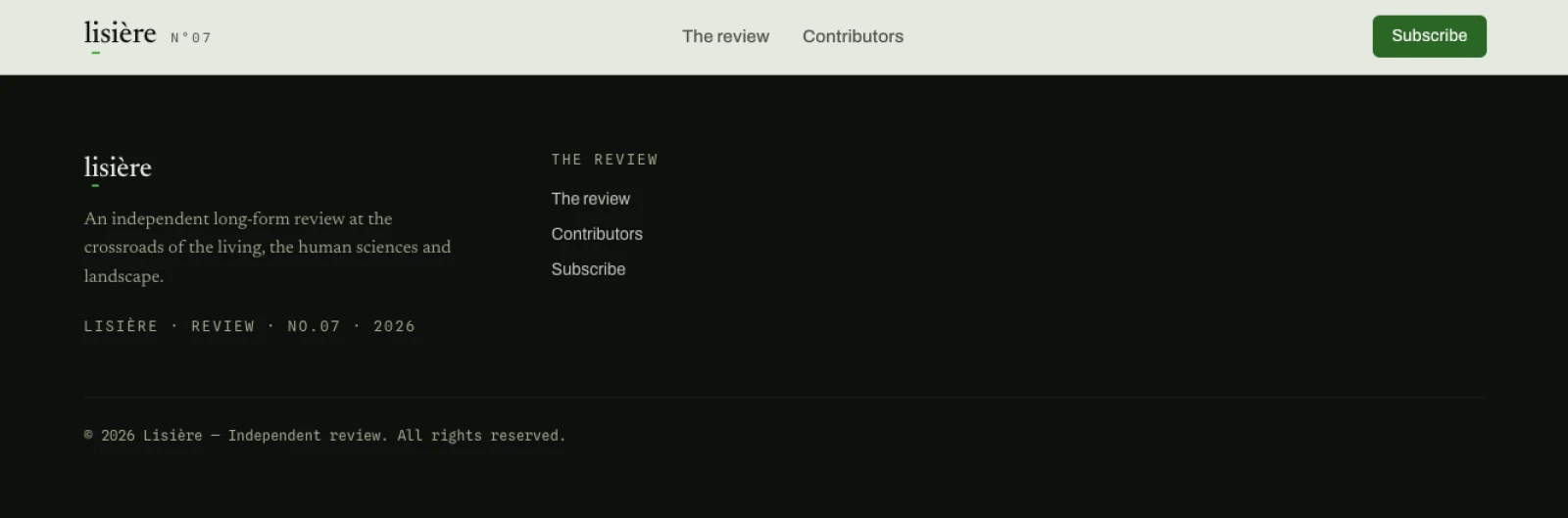
That is the whole page. The header and the footer are real, and everything between them is the empty <main> — no content-type has a template yet, so the dispatcher has nothing to include.
Two absences in that render are deliberate. There is no Sections column and no separator in the menu, because both are guarded on globals.sections.size and the collection is still empty — an empty collection has to degrade to nothing, not to an orphan divider. And there is no Follow column: the prototype links to social profiles that do not exist, so those became two global fields left empty, and the column renders only once someone fills them.
3. The content, before the templates
The usual order is templates first, then content — you want to see one block render before you author fifty. Here it is worth inverting, and saying why in the prompt:
Go, but content before templates: I want the elements written against real
data rather than against a guess about its shape.
Media first, then the sections, the contributors, the articles, then the
five blocks on the home page.
Only the first sentence is yours to write. The rest of that prompt is a to-do list the agent produced itself one section ago, repeated here because an agent that has just compacted its thread no longer has it — and because the order inside it matters: an entry authored before its image keeps an empty image field for good.
⏺ quilium media upload proto/assets/img/*.png  (×6)
  ⎿ 6 uuids. The MCP upload takes a URL, not a local path — the CLI is the
    only way in for a file on disk. Alt text set on each from the
    prototype's own alt attributes.

⏺ create-itemset-item(section) ×4, (contributor) ×4, (article) ×7
  ⎿ 4 sections, 4 contributors, 7 pieces — 1 flagged Featured, 6 for the
    feed. Five carry a cover, two do not.

⏺ One data change worth flagging. The prototype's feed is hand-ordered, and
  its dates do not match that order — the second card is dated three days
  before the third. A query sorts by publishedAt desc, so I moved one date
  (The watershed line, June 2 → June 8) to make the query reproduce the
  prototype's layout. Say the word if the date was the intent.

⏺ add-content-to-page(row1) ×5
  ⎿ featured, articleFeed, sectionList, reviewBand, newsletterBand.
    Nothing to fill on the three query fields — they resolve at render.
The two wrappers are not the same, and mixing them is a 422: collection entries take data, content blocks take custom. Images are the other shape trap — [{id}] for media, a flat ['uuid'] for every other reference.
That date change is the kind of thing worth reading twice. Nothing was broken: the prototype is a static file where the author placed the cards by hand, and the review's real editor would have done the same. The moment that layout became a query, the order stopped being a design decision and became a property of the data — so either the data carries it, or the page renders in an order nobody chose.
sortable is ordered by dragging its rows in the back-office, and that gesture has no MCP equivalent — _order is read-only from the outside. Four sections that nobody has dragged come back in whatever order the database feels like, and it changes between renders. The fix is a second sort key: _order first, then created_at, so untouched rows keep the order they were created in and a later drag still wins.4. The dispatcher and the five elements
The dispatcher already ships with the starter, and it is one line — it loops a drop-zone and includes each block's own template:
{% for content in section %}{% if content.template %}{% include content.template %}{% endif %}{% endfor %}
That single line is what makes the content model extensible: a new content-type is a new file in elements/, and nothing else changes. Which is why the prompt at this stage is as short as it will ever be:
Now the five elements. Nothing else.
Everything that used to go in a prompt — match the markup, keep the classes, no invented links — is in the project file by now. Nothing else is the only word doing work: it stops the agent from carrying on into the section pages while it has momentum.
⏺ get-skill × 3
  ⎿ reference-fields-catalog, reference-dates, practices-patterns-sortable

⏺ Wrote elements/featured.liquid, articleFeed.liquid, sectionList.liquid,
  reviewBand.liquid, newsletterBand.liquid — plus _date.liquid, see below.

⏺ Three things the page told me:

  1. A query does not hydrate its relations. `author` and `section` came
     back as bare uuids, so the byline printed nothing. `with:` on the
     query config resolves them — it is one bullet in the catalog, and the
     same catalog says the opposite two sections earlier under `items`
     ("query only hydrates .id, resolve it by hand in the template").
     Patched both queries with `with: [section, author]`.

  2. Liquid indexes an array by a variable, never by an expression.
     spans[forloop.index0 | minus: 1] silently read the wrong slot: the
     first card lost its width and the last one rendered one word per line.
     Two lines instead of one.

  3. The date filter runs on MomentJS, whose locale here is French — MMMM
     printed "juin 12, 2026" on an English site. The filter's second
     argument is an interval, not a locale, and the site carries no locale
     object to override. Numeric tokens are locale-free, so the month name
     is looked up in _date.liquid and included from both templates that
     print a date.
None of those three is findable by reading. The first one looks like an editor who forgot to fill a field, the second like a CSS problem, the third like a typo — and all three are invisible until the page is on screen. The first is also the more interesting failure, because the answer was in the documentation: one line of it said with:, another said to resolve the relation by hand. A page on screen settles that argument in one render.
The one genuine design decision in there is the feed's grid. The prototype's press layout is asymmetric on purpose: one piece full width, then five in a twelve-column band at 7-5-4-4-4. Those five numbers are a design decision, not an editorial one, so they stay in the template as a plain list rather than becoming five fields nobody would ever want to edit:
{% assign spans = '7|5|4|4|4' | split: '|' %}
...
{% assign spanIndex = forloop.index0 | minus: 1 %}
{% assign span = spans[spanIndex] %}
<article class="… md:col-span-{{ span }}">
spans[forloop.index0 | minus: 1] does not error — Liquid parses it as spans[forloop.index0] and reads the wrong slot for every single card. Assign the index first, then index the array. The same rule applies anywhere you were about to filter inside brackets.5. Look at it
npm run quilium
The two servers from the first tutorial are the whole check: the prototype on 9055, the site on 9056, side by side in two tabs.
What you are checking, in this order: the page returns 200, no Liquid leaks into the HTML ({{, {%, [object Object], undefined), the image count matches what you authored, and only then whether it looks like the prototype.
curl -s localhost:9056/ | grep -c '{{\|{%\|\[object Object\]\|undefined'
Zero is the only acceptable answer. A leaked {% means a tag the engine did not recognise; a leaked undefined means a field name that does not exist on the object you think you are reading.
The other place to look is the back-office, which previews the same page without a terminal:
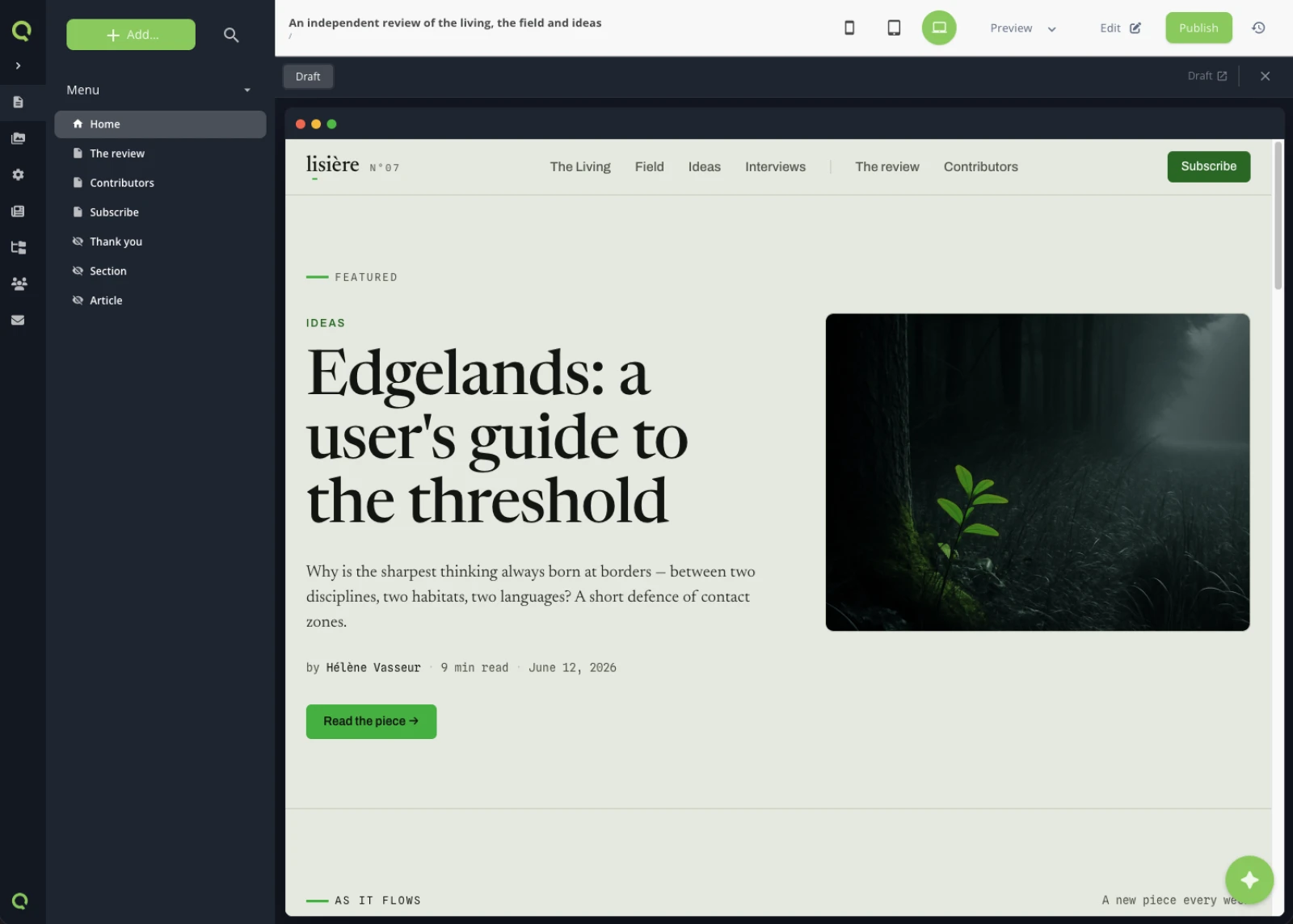
Two things in that tree are worth a second look. Section and Article are marked hidden — they are the pages the two detail routes point at, and they have no template yet. And the page is still a Draft: everything you have built is visible to you and to no one else, which is where it stays until someone presses Publish.
And then the check that needs no tooling — the two tabs, same width, side by side. One of these is the prototype and one is served by Quilium out of a query, and the point of the whole tutorial is that you cannot tell which:
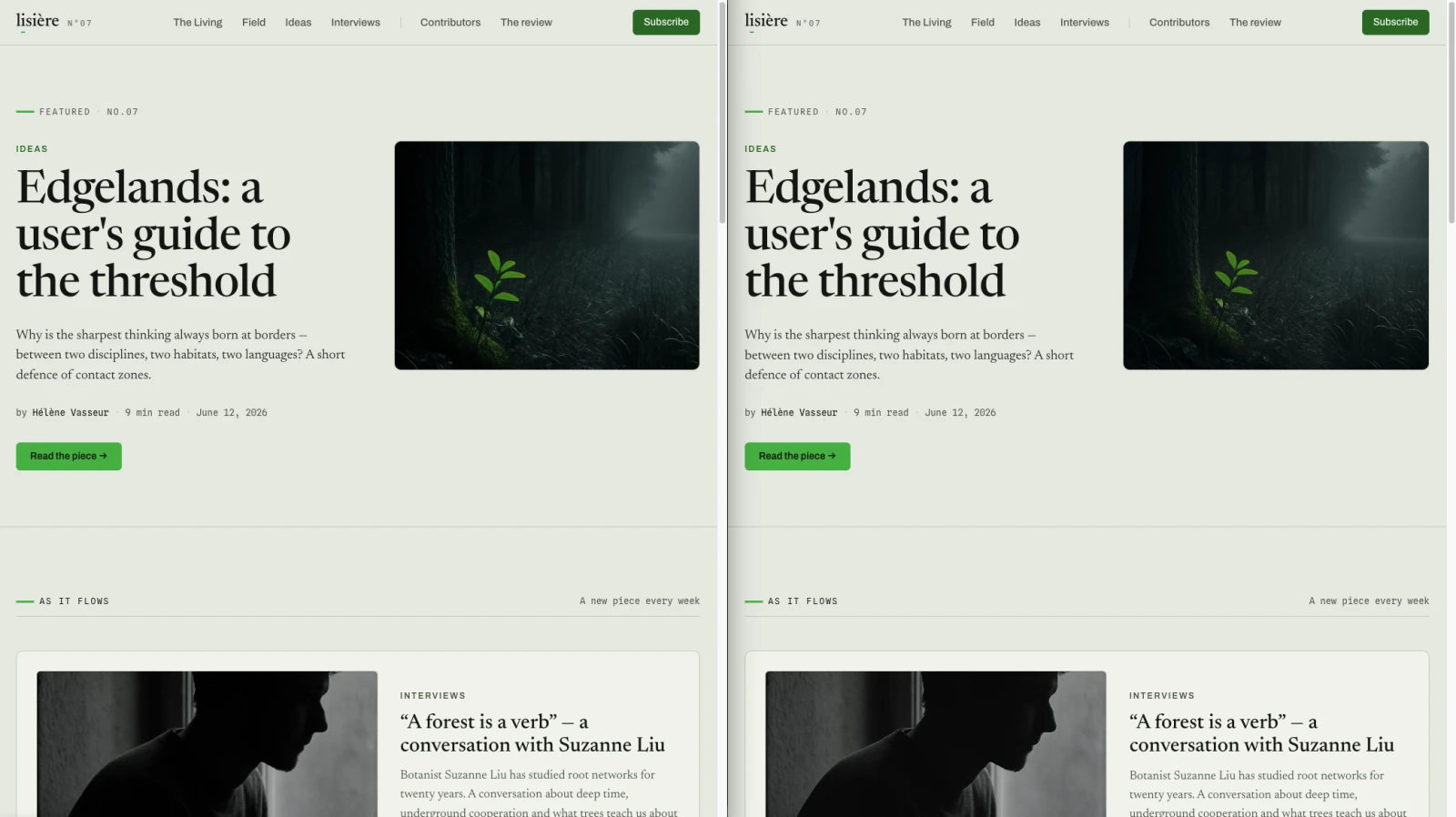
/article/<slug>, and that page-type has no template yet. A route that resolves to a missing template is a 500, not a 404: the link is right, the file is missing. It gets written two tutorials from here.What you learned
- The layout is written once and every page inherits it.
- A block carries its queries; the template just iterates them, and
with:is what turns a relation into something you can print. - The dispatcher is what makes the content model extensible without touching the plumbing.
- Order that used to be a design decision becomes a property of the data the moment a query draws the list.
The structure behind all this is in Build a template.
Next: A static page — the easy one, on purpose.
Last updated September 7, 2026.